
Track your sleep. Know your energy.
Your energy starts
the night before.
A gentle sleep tracker for iPhone and Android: last night in plain words, today's energy at a glance, and when to wind down. No watch needed.
Built on sleep science.
Explained, not hidden.
Energy Clock's numbers come from well-known ideas about sleep — sleep pressure, sleep inertia, the afternoon dip and the evening second wind — worked out on your phone from the nights you confirm. The app explains its sleep-debt and energy math in plain words, under Settings → How This Works.
The model, animated
How Energy Clock draws your day
The app's own model: grogginess right after waking, a late-morning peak, an early-afternoon dip and an evening second wind, placed across your real awake hours. Sleep debt pulls the whole day down, and the dip most. An estimate to plan around — not a measurement. Hover or drag to move through the day.
- 14nights
of history behind your sleep-debt number, recent nights counting most.1
- ±30min
how close to your schedule a night must land to count toward your streak.2
- 4ways
to track sleep, none of which needs a watch.3
- 0servers
Everything is worked out on your phone. No account, no ads, no analytics.4
- 1) Sleep debt is a recency-weighted average of each night's shortfall against your target over the last 14 nights; a night's weight halves about every 7 days, and each night is capped so one unusual night can only move the number so much.
- 2) The default tolerance for bedtime and wake time; you can change both in Settings. The streak counts consistency, never hours slept.
- 3) Automatic Nightstand (motion and activity), Mattress, Manual, or sleep records in Apple Health or Health Connect. Every estimate is confirmed or corrected by you each morning.
- 4) The app makes no network requests. See the privacy policy.
Sleep, without a watch.
Last night, in plain words.
How much you slept, and how much you're behind — in words, not scores.
Last night, confirmed in a tap
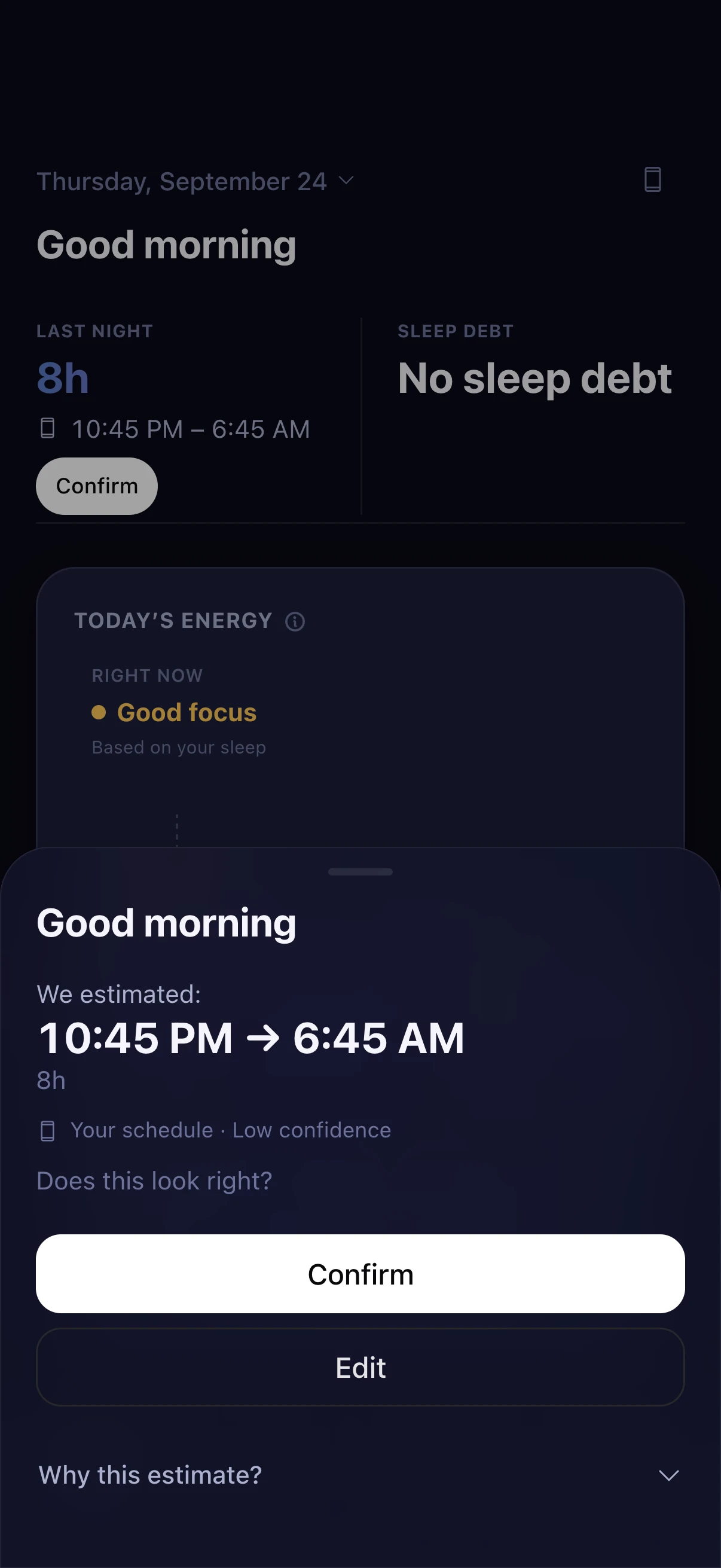
Each morning Energy Clock shows its estimate of when you fell asleep and woke up. Confirm it, or fix the times and add any minutes you lay awake.
Sleep debt in plain language
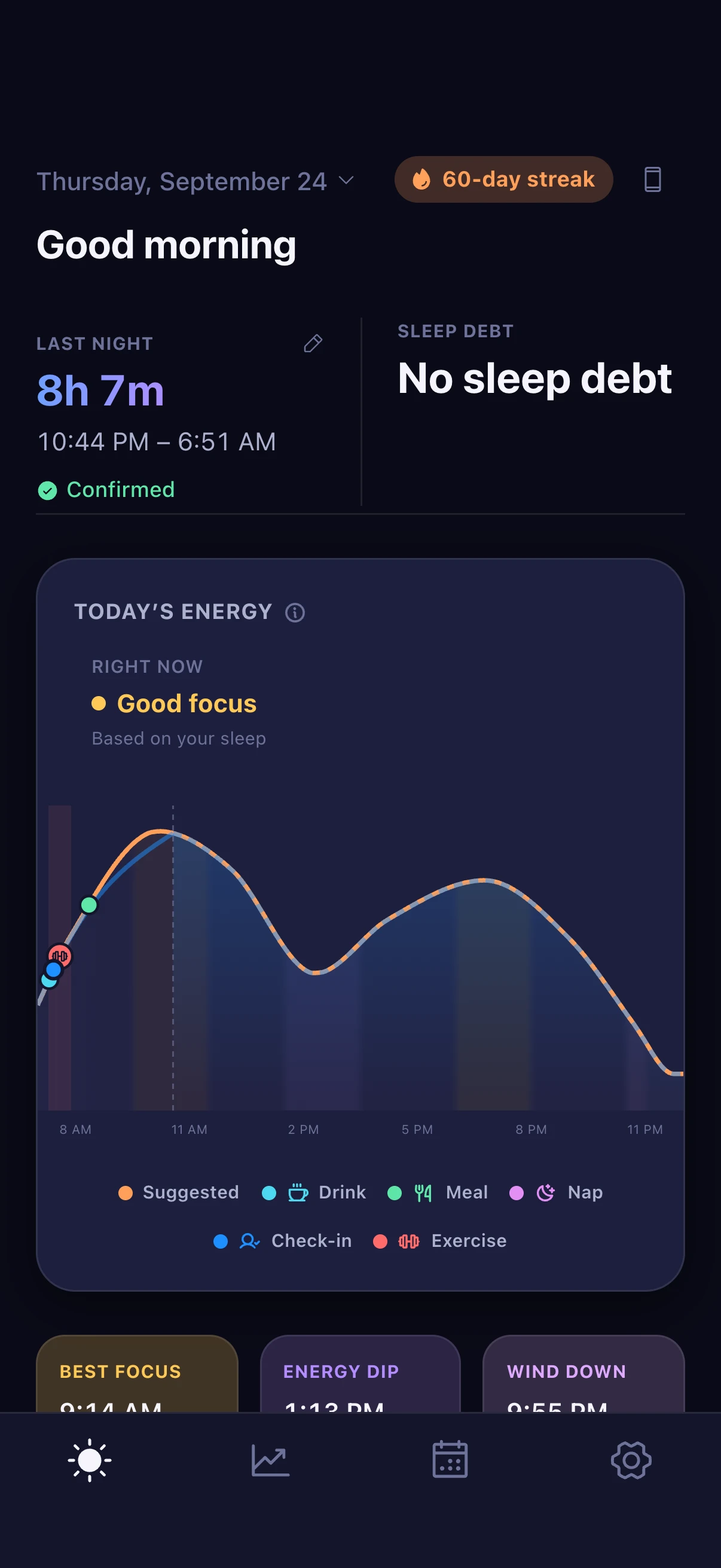
A recency-weighted average of how far under your target you've been over the last 14 nights, so last night counts most. It reads “No sleep debt” or “48 min” — never a scary decimal, and extra sleep never shows as a negative.
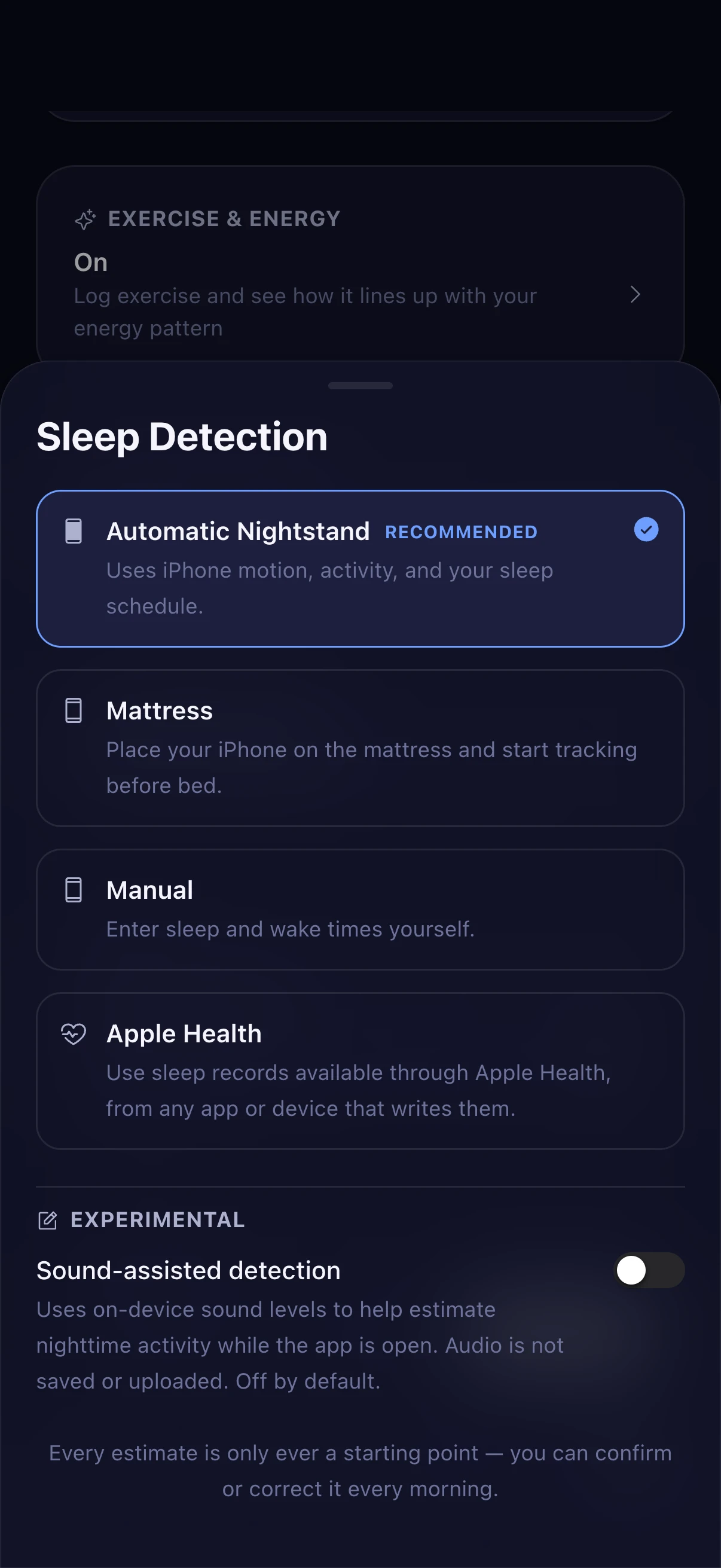
Sleep tracking without a watch
Automatic Nightstand uses your phone's motion and activity with your schedule; Mattress mode reads movement with the phone on the bed; or enter times yourself, or use Apple Health or Health Connect. Every estimate is only a starting point.
Naps that count, partly
Log a nap and it counts toward your sleep debt at partial credit, separate from nighttime sleep. Turn nap tracking off in Settings if you never nap.
Your energy, drawn.
The day ahead, at a glance.
An estimate of your day to plan around — labeled as one.
Today's energy curve
A simplified curve built from a few well-known ideas — grogginess right after waking, the afternoon dip, the evening rebound — nudged by your recent sleep debt, consistency and naps. It's an estimate, not a sensor reading.
Today's Plan
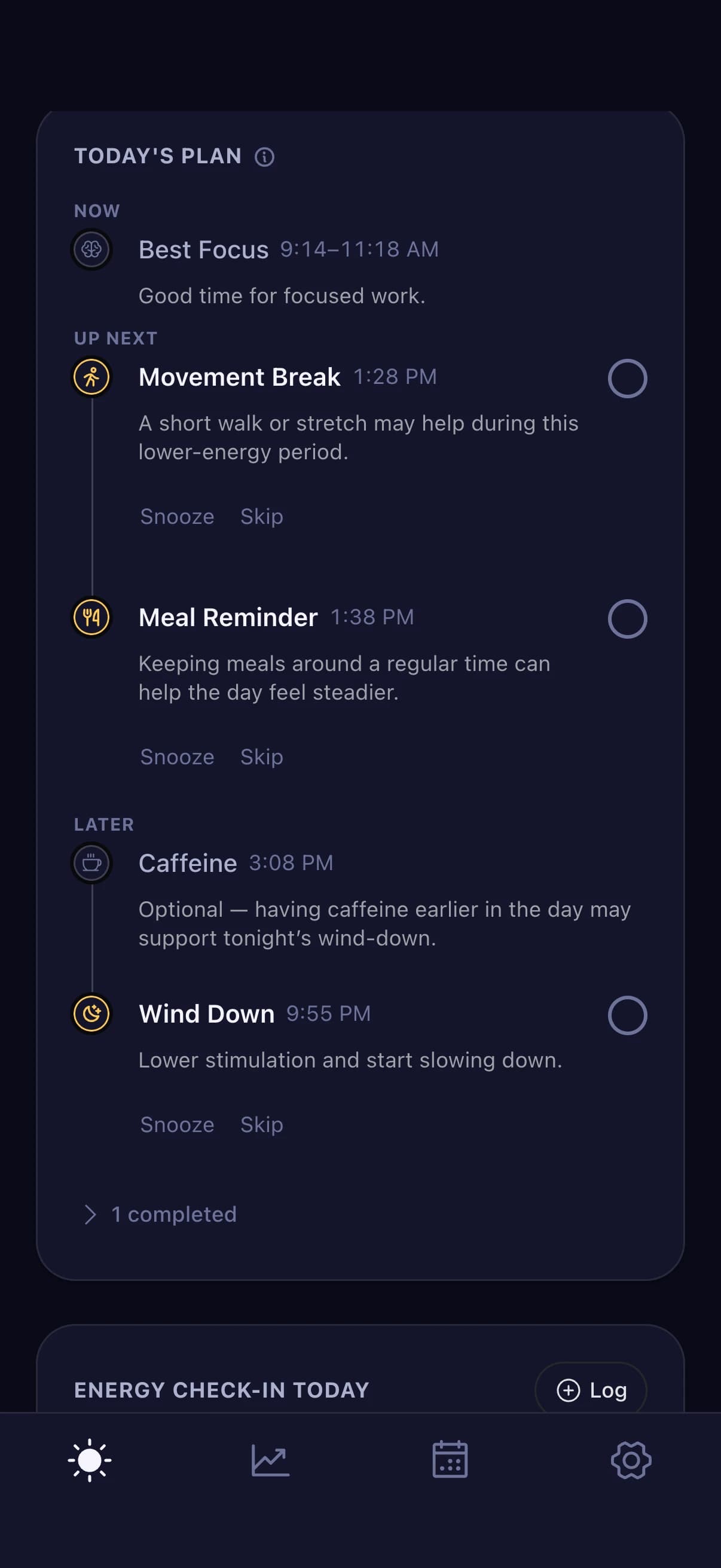
Optional suggestions timed to your curve: morning light, hydration, a focus window, a movement break, wind-down. Check them off, snooze or skip them. A starting plan, not a rulebook.
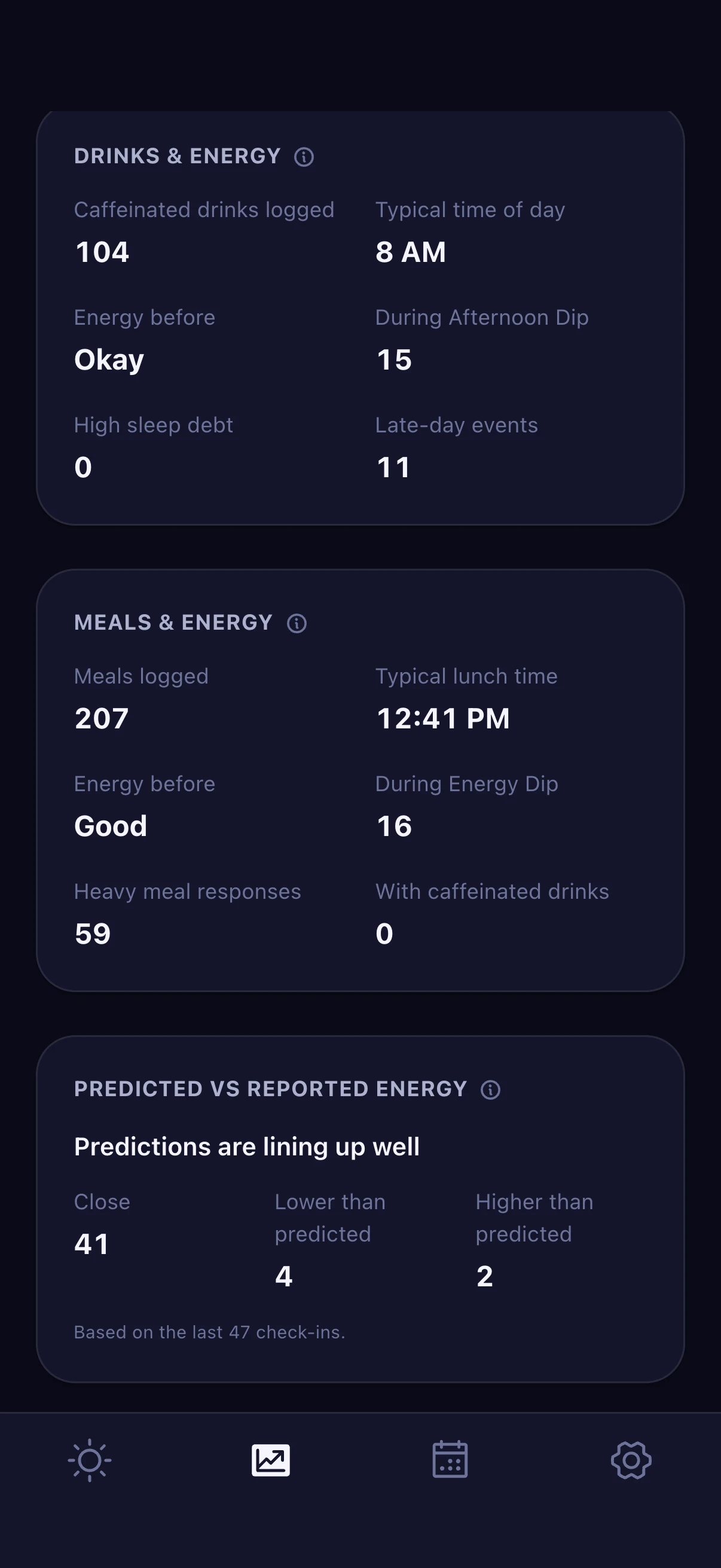
Energy check-ins
Tap Low, Okay, Good or Sharp now and then. Trends compares what you reported with what the curve predicted, so how well the estimate fits you stays visible instead of assumed.
Wake & wind-down.
When to get up, when to slow down.
When to get up, when to start slowing down, and a streak that rewards consistency.
A wake window, not an alarm
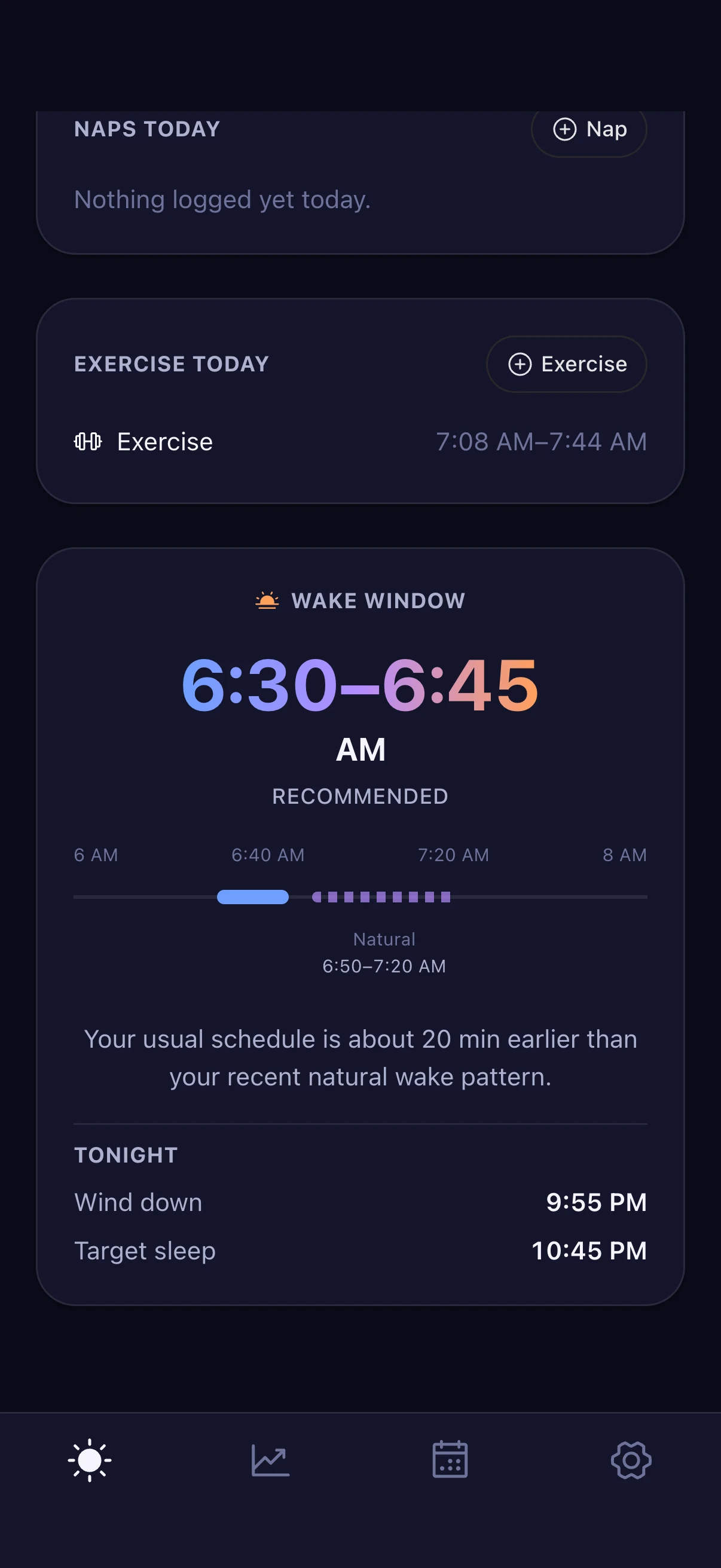
Your schedule's required wake time, your natural wake range learned from recent mornings, and a recommended window between them — which never runs past a time you have to be up.
One-off changes, and gentle shifts
Need to be up early tomorrow? Change just that day, or make it your new schedule — with an optional step-by-step ramp so a big change doesn't happen overnight.
A wind-down reminder
One gentle nudge at your wind-down time, set a chosen number of minutes before target sleep. Optionally, a note when your wake window opens. Both are local notifications from your phone.
A streak for consistency
Counts nights your bedtime and wake time landed near your schedule — not hours slept. A missed or off-schedule night just quietly starts a new count. No broken-streak guilt.
What shapes your day.
Optional logs, on the same chart.
Optional logs, each placed on your energy chart so you can see how the day went.
Drinks and caffeine
Water, coffee, tea, soda, energy drinks and more, with saved favorites. Caffeine tracking is for adults only, and Trends compares late-caffeine days with the rest — a comparison, not a claim of cause.
Meals
Breakfast, lunch, dinner or a snack, and whether it felt light, normal or heavy. No calories, no ingredients, no diet advice.
Exercise
Log when you moved and see it on the same chart as your energy.
Trends & history.
Patterns you can check.
Your own numbers, put next to each other.
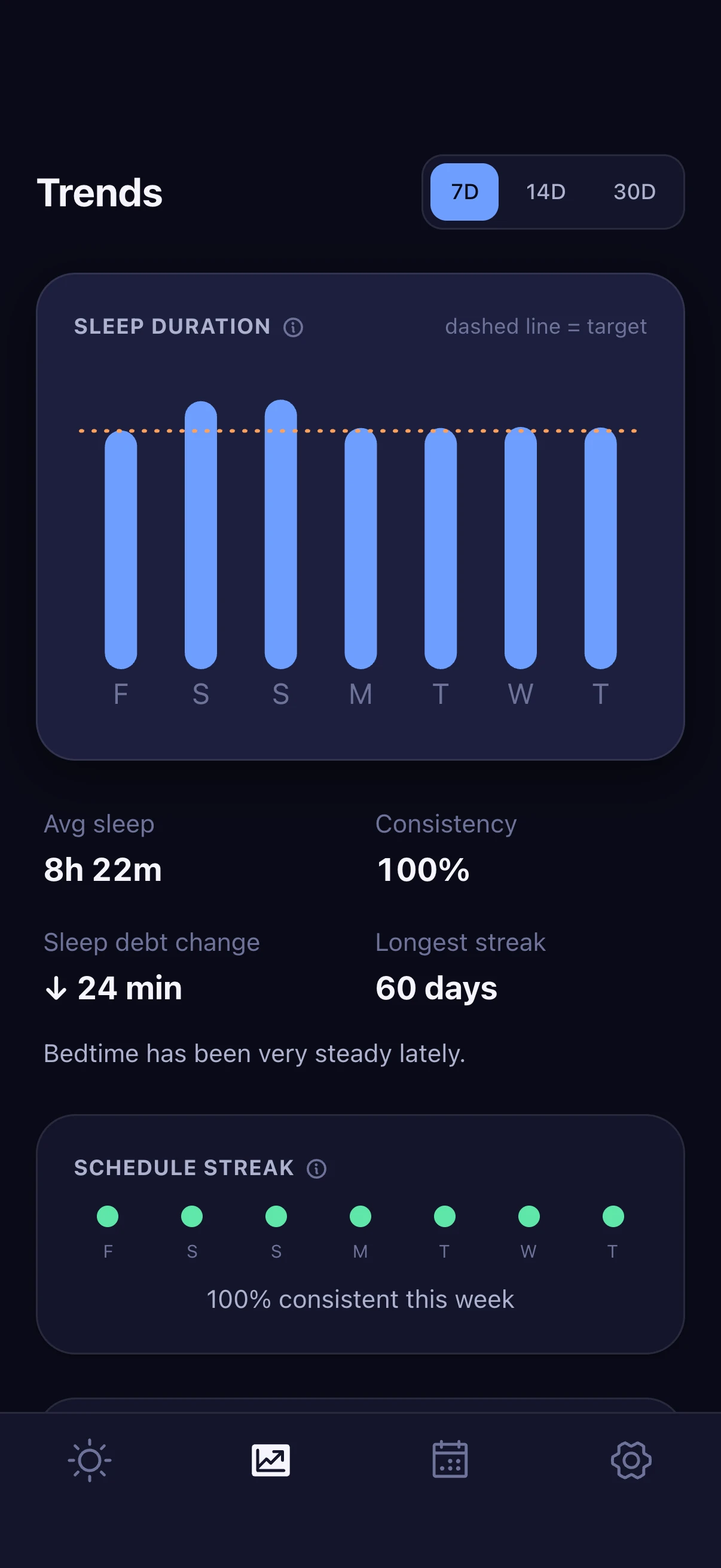
Trends over 7, 14 or 30 days
Sleep duration against your target, wake timing against your schedule, sleep debt over time, morning energy, and your weekly consistency.
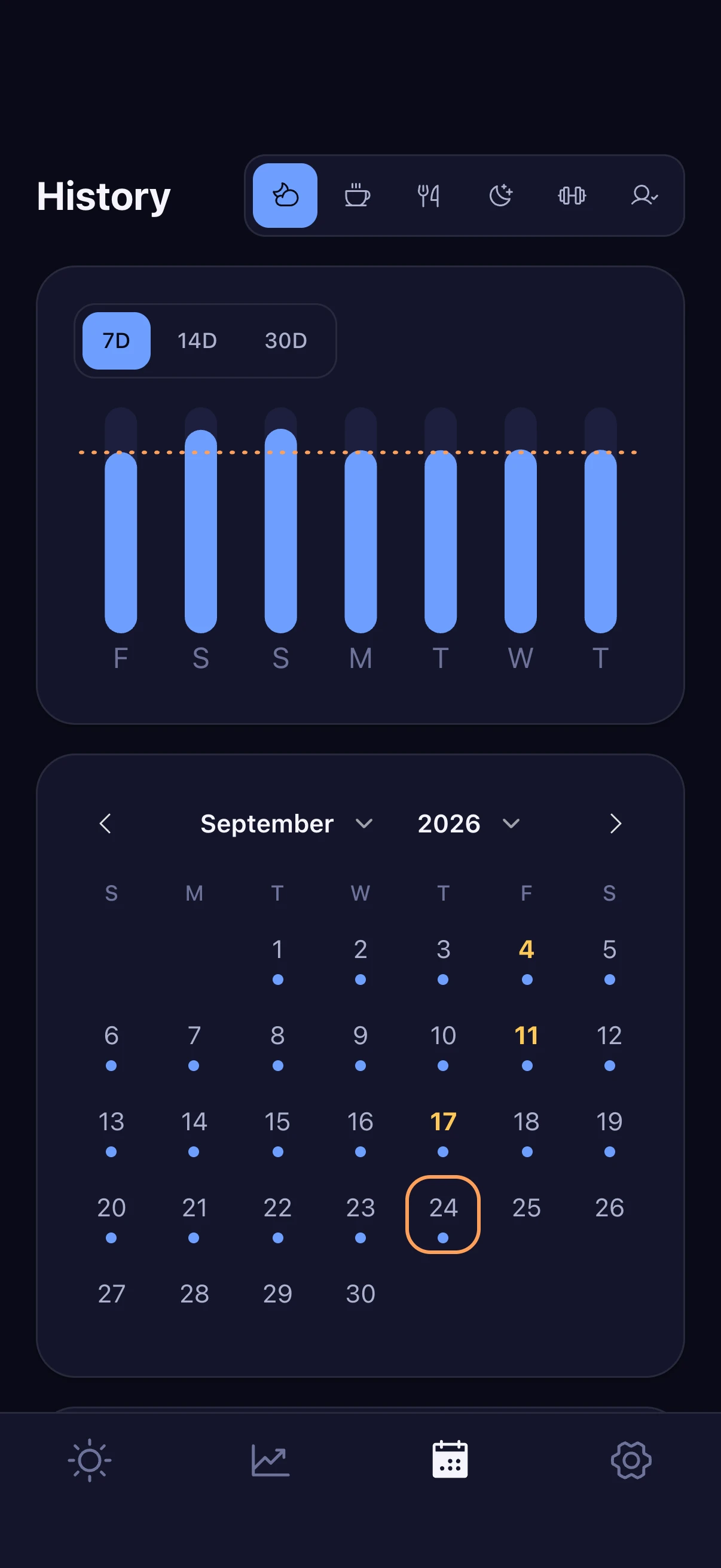
A calendar of every night
Tap any day for its sleep and a timeline of what you logged — drinks, meals, check-ins, exercise — beside that day's energy chart. Nights under your goal are marked gently, never in red.
Plain counts, never a verdict
Insights are counts and medians from what you logged. They never invent a percentage, never give dietary advice, and never say a drink or meal caused how you felt.
Yours to keep.
It's your data.
The ways to adjust it, take it with you, or remove it.
Adjustable, and explained
Your sleep target, tolerances, wind-down lead and sleep latency are plain numbers in Settings. After about ten days Energy Clock may suggest a new target — it never applies one for you. Settings → How This Works explains the math.
Export your history
Export your sleep, check-ins, naps, drinks and meals as CSV or JSON — full records, not summaries — through your phone's share sheet.
Light, dark, or your phone's setting
Energy Clock follows your phone's appearance, or you can pick light or dark, and it respects larger text sizes.
Erase it all, any time
Settings → Erase sleep history removes everything you've logged, after a second tap to confirm. There's no account to close.
How it works.
From first launch to a steadier rhythm.
1
Tell it about your days
About two minutes of questions: your age, what sets your wake-up (school, work, family, shifts, or nothing at all), and how you usually sleep. You get a starting schedule straight away.
2
Check last night each morning
Energy Clock shows its estimate of when you slept. Confirm it, or fix it in a tap — and say how you feel. Confirmed nights are what everything else learns from.
3
Plan around today's energy
See when focus should come easiest and when the dip is likely, with an optional plan for light, water, movement and breaks. Log drinks, meals and check-ins if you like.
4
Wind down on time
A gentle reminder at your wind-down time, and tomorrow's wake window. Over the days, Trends shows your consistency, and your natural rhythm comes into focus.
A look inside.
Real screens, in both of its looks.
Captured from the app itself, filled with made-up sample data from its own Mock Data.
Last night, and today's energy
A quick check each morning
A plan built around your energy
When to wake, and why
A week of sleep, at a glance
Plain counts, never a verdict
Every night on the calendar
Choose how sleep is tracked
Private by design.
Your nights stay yours.
A plain-language summary of how the app handles what you log. The full privacy policy is the complete version and takes precedence.
Your sleep times, check-ins, naps, drinks, meals, exercise and settings are kept in the app's storage on your phone.
No account, no ads, no analytics and no trackers in the app. Nothing to sign up for, nothing to close.
Energy Clock has no server and doesn't upload what you log. Whether your phone's own backup includes it is your choice, in your phone's settings.
Apple Health and Health Connect are optional and read-only: sleep records only, used to pre-fill your morning check-in. Motion data is summarized on the phone.
Sound-assisted detection is experimental and off by default. If you turn it on, audio is never saved or uploaded.
Erase your history whenever you like: Settings → Erase sleep history, with a second tap to confirm.
Frequently asked questions.
What is Energy Clock?
Energy Clock is an app for iPhone and Android that tries to answer four questions simply each day: how much did I sleep, how much sleep debt do I have, when will my energy likely be highest or lowest today, and when should I start winding down tonight.
Do I need an Apple Watch or a sleep tracker?
No. Energy Clock can estimate your sleep from your phone alone (its motion and activity, plus your schedule), with the phone on your mattress, from times you enter yourself, or from sleep records in Apple Health or Health Connect if another app or device writes them. Whichever you choose, you confirm or correct the estimate each morning.
Who is it for?
Anyone 13 or older. During setup Energy Clock asks your age and what your days look like — school, work, shift work, family or your own schedule — and uses that for its starting sleep target and wording. Age only sets a starting point; your own confirmed nights and mornings take over from there. Caffeine and intimacy logging are only offered to adults (18+).
What is sleep debt, and how is it worked out?
It's how far under your sleep target you've been lately. Energy Clock looks at your last 14 nights, weights recent nights more heavily, and limits how much one unusual night can move the number. It's shown in plain words — “No sleep debt” or “48 min” — and extra sleep never turns it negative.
How accurate is the energy curve?
It's an estimate, not a measurement. The curve is a simplified illustration of a few well-known ideas — grogginess right after waking, a natural afternoon dip, an evening rebound — adjusted by your recent sleep debt, schedule consistency and naps. No sensor reads your energy. If you log quick energy check-ins, Trends shows how often the prediction matched what you reported.
Does it show sleep stages like deep or REM sleep?
No, on purpose. Energy Clock only works with asleep and awake times. Even when it reads Apple Health or Health Connect, stages are combined into a single “asleep” value before the app sees them, so it can't show stage detail it doesn't really have.
Do I need an account?
No. There's no sign-up, no sign-in and no email address to give. Answer a short set of questions about your schedule and sleep, and you're set.
Where is my data stored?
On your phone, in the app's own storage. Energy Clock has no server and doesn't send what you log anywhere. Copies can exist outside the app only through things it doesn't control: your phone's own iCloud or Google backups (if you've turned them on), files you export, and anything you email us.
Does it use the microphone?
Only if you turn on the experimental sound-assisted detection, which is off by default. It reads sound levels on the device while the app is open and keeps only a simple activity number — audio is never saved or uploaded.
What reminders does it send?
A wind-down reminder at your wind-down time (on by default, and you can turn it off), and optionally a note when your wake window opens, a few Energy Coach suggestions per day, and meal-logging reminders. They're local notifications delivered by your phone — nothing is sent from a server — so they depend on your phone's settings and its Focus or Do Not Disturb modes.
Can I change my sleep target?
Yes. It starts from general guidance for your age and is a plain number in Settings. After about ten days of history Energy Clock may suggest adjusting it, and explains why — but it never changes it for you, and changing it never rewrites past nights.
Does Energy Clock give medical advice?
No. Energy Clock is for keeping your own record and planning your day. It isn't a medical device and isn't intended to diagnose, treat or rule out any sleep disorder or other condition. If you're worried about your sleep, daytime sleepiness or snoring, talk to a doctor.
How do I delete my data?
In the app: Settings → Erase sleep history, with a second tap to confirm, removes everything you've logged. Deleting the app removes all of its storage from your phone. Neither can reach copies outside the app, like files you exported. See /delete-data for exactly what each step does.
Which devices does it work on?
Energy Clock is being prepared for iPhone and Android phones. The download section shows when it's available on the App Store and Google Play. The app is in English for now.
How do I get help or report a problem?
Email support@r5iot.com (subject: “Energy Clock Support”). Tell us what happened and, if you can, your phone model and its iOS or Android version.

Start tomorrow a little brighter.
Your energy starts the night before.
Energy Clock is a sleep and energy tracker, not medical advice. If you're worried about your sleep, talk to a doctor.